-
×
 Girl Loves Sooners Rhinestone
1 × $5.99
Girl Loves Sooners Rhinestone
1 × $5.99
Freebies
Free Senior 2027 Rhinestone Template SVG Download
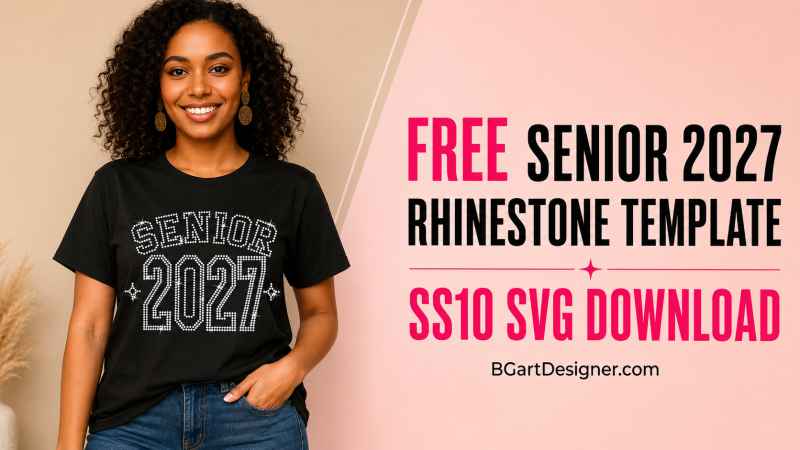
Free Senior 2027 Rhinestone Template SVG for Cricut and Silhouette
Are you preparing Class of 2027 graduation shirts, senior outfits or sparkling school apparel? Download this free Senior 2027 rhinestone template and create a bold one-color design using SS10 hotfix rhinestones.
This free graduation rhinestone SVG features arched varsity-style lettering and large, easy-to-read 2027 numbers. The simple one-color layout makes it a practical test design for crafters learning to cut rhinestone flock with Cricut, Silhouette Cameo, Brother ScanNCut or another compatible cutting machine.
The template is supplied at the correct size for SS10 stones and is ready to use as a personal craft project.
FREE DIGITAL DOWNLOAD: This page provides a digital rhinestone template. No shirt, rhinestones, transfer or physical product will be shipped.
What Is Included in the Free Senior 2027 Download?
The downloadable ZIP folder includes the file formats commonly used with electronic cutting machines:
- SVG
- EPS
- DXF
- PLT
- PNG for mockup
- Silhouette Studio STUDIO3
- Personal-use license and basic instructions
The design contains one rhinestone color and requires one template cut, making it easier to test than a large multicolor rhinestone design.
Free Template Specifications
- Design: Senior 2027
- Style: Arched varsity lettering
- Rhinestone size: SS10
- Template hole size: 3 mm
- Number of colors: 1
- Number of template cuts: 1
- Finished size: [10] × [7.8] inches
- Total rhinestones: [1102]
- Product type: Digital download
- License: Personal use only
Do not resize the design after importing it into your cutting software. Changing the overall dimensions also changes the size and spacing of the circles, which can prevent SS10 rhinestones from fitting correctly.
Download the Free Senior 2027 Rhinestone SVG
Use the button below to download the ZIP folder containing the free Senior 2027 rhinestone template.
By downloading this design, you agree to the BGartDesigner free-file license. You may use it for personal projects, but you may not sell, share, upload, copy or redistribute the digital files.
What You Need to Make a Rhinestone Shirt
Before starting your graduation project, gather the following supplies:
- Electronic cutting machine
- Rhinestone template flock
- Cutting mat
- SS10 hotfix rhinestones or rhinestuds
- Rhinestone brush
- Transfer tape
- Heat press
- T-shirt, sweatshirt or compatible garment
- Weeding tool or lint roller for removing cut circles
A black garment creates strong contrast with crystal, silver, pink, gold or school-color rhinestones, but you can choose any stone and shirt combination you prefer.
How to Use the Senior 2027 Rhinestone Template
1. Download and Extract the ZIP Folder: SVG, PLT, EPS, DXF, PNG and STUDIO3 files included
Download the ZIP file and save it to your computer. Extract the folder before attempting to import the design into your cutting software.
Opening files directly from a compressed folder can cause importing or saving problems.
2. Select the Correct File Format
Choose the file that works best with your machine and software:
- Cricut Design Space: SVG
- Silhouette Studio Basic Edition: STUDIO3 or DXF
- Silhouette Studio Designer or Business Edition: SVG or STUDIO3
- Brother CanvasWorkspace and ScanNCut: SVG
- Compatible rhinestone or commercial cutting software: EPS, DXF or PLT
Always confirm that your particular software edition can import the selected format.
3. Check the Imported Size
After importing the design, confirm that it measures:
[10] wide × [7.8] high.
Do not use “Fit to Page,” automatically resize the design or change only one dimension. Rhinestone templates must maintain their original proportions and circle size.
4. Perform a Small Test Cut
Different brands of template flock, blades and cutting machines may require different settings. Before cutting the entire Senior 2027 design, test a small group of circles using a scrap piece of flock.
The circles should lift cleanly from the backing without tearing the surrounding template material.
5. Cut the Rhinestone Flock
Place the rhinestone flock on the cutting mat with the flock surface facing upward. Load the mat and send the design to your machine.
After cutting, remove the flock from its backing and place it on a smooth rhinestone work surface or reusable backing board.
A lint roller can help remove the small cut circles from the template.
6. Brush the SS10 Rhinestones Into Place
Pour the rhinestones over the template and move them gently with a rhinestone brush. Most stones will turn right-side up and settle into the circles.
Remove extra stones and check that every template hole contains one correctly positioned rhinestone.
7. Pick Up and Press the Transfer
Place rhinestone transfer tape over the completed design and press it gently so that every stone adheres.
Lift the transfer slowly and inspect it before placing it on the garment. Follow the temperature, pressure and pressing-time recommendations supplied by your rhinestone manufacturer.
Use a protective sheet when required and allow the garment to cool according to the manufacturer’s instructions.
Can I Use This Template With Cricut Design Space?
Yes. Upload the included SVG file into Cricut Design Space and confirm the original dimensions before cutting.
Cricut’s official instructions explain how to upload SVG and DXF files into Design Space. Do not flatten or convert this rhinestone template into a Print Then Cut image because the individual circles need to remain cut paths.
Can I Use It With Silhouette Studio?
Yes. Use the included STUDIO3 file if you have Silhouette Studio Basic Edition. Users with Designer or Business Edition can normally import the SVG version.
After opening the file, verify the size and perform a test cut before cutting the full template.
Troubleshooting Common Rhinestone Template Problems
The Rhinestones Do Not Fit
Confirm that you are using SS10 stones and that the design was not resized. The finished width and height must match the dimensions supplied with the download.
The Circles Stay Attached to the Flock
Increase the cutting force slightly or check the blade condition. Test only a small section after each adjustment to avoid wasting material.
The Flock Tears During Cutting
The force may be too high, the blade may extend too far or the mat may be excessively sticky. Reduce one setting at a time and repeat the test cut.
The SVG Imports at the Wrong Size
Manually enter the exact finished width while keeping the aspect ratio locked. Then verify that the height also matches the dimensions listed on this page.
Cricut Design Space Takes Too Long to Load
Rhinestone SVG files contain many individual circular paths. Close unnecessary projects and applications, use the desktop version when possible and allow the program time to process the file.
Want a More Glamorous Senior 2027 Design?
The free template is intentionally simple and uses one rhinestone color, making it suitable for practice and personal projects.
For a larger, more detailed graduation shirt, see our premium Senior 2027 rhinestone template. It combines oversized varsity numbers with elegant script lettering, two rhinestone colors and 2,636 SS10 stones.
The premium download includes SVG, PLT, EPS, DXF, PNG and STUDIO3 files and can be used with compatible Cricut, Silhouette, ScanNCut, Roland, GCC and automatic rhinestone systems.
More Graduation Rhinestone Designs
Continue planning your graduation collection with these BGartDesigner resources:
- Browse all rhinestone templates
- Explore our graduation rhinestone SVG designs
- Download more free rhinestone templates
- View the Senior Year rhinestone SVG
- Create a graduation cap rhinestone project
Frequently Asked Questions
Is this a physical rhinestone transfer?
No. This is a free digital template. No physical shirt, transfer, rhinestones or supplies will be mailed.
What rhinestone size does the template use?
The design is created for SS10 rhinestones using 3 mm template circles.
Can I resize the template?
No. Resizing changes the circle diameter and spacing. Use the file at its supplied dimensions for SS10 stones.
Can I change the rhinestone color?
Yes. The template uses one cutting layer, but you can fill it with crystal, pink, gold, silver or your preferred school color.
Can I cut this design with Cricut?
Yes. Use the included SVG file and confirm the finished dimensions after importing it into Cricut Design Space.
Can I use Silhouette Studio Basic Edition?
Yes. Use the supplied STUDIO3 or DXF file. SVG importing may require Silhouette Studio Designer Edition or Business Edition.
Can I sell the digital file?
No. You may not resell, share, upload, trace, copy or redistribute the digital template.
Can I sell shirts made with the free template?
The free download is licensed for personal use only. Contact BGartDesigner or purchase the appropriate commercial license before selling finished products made with the design.
Final Tips
Always test your flock and cutting settings before cutting the complete template. Keep the original ZIP folder as a backup and never overwrite the master files after importing them into your software.
If you make a Senior 2027 shirt using this free rhinestone template, share your finished project and tag BGartDesigner. We would love to see the colors and materials you choose.
Written and designed by Briggitte Rivas, creator of BGartDesigner rhinestone templates and digital cut files.
